
I’ve been playing around with building a realtime video AI agent with Google’s Gemini Live API, and integrating it into a Genesys Cloud chatbot journey. In this article I want to share how it works, and the considerations for implementing something similar yourself.
Let’s start with the concept and then look at how it turned out. Afterwards, I’ll take you through the nitty-gritty of how it all works, and the various trade-offs.
The concept
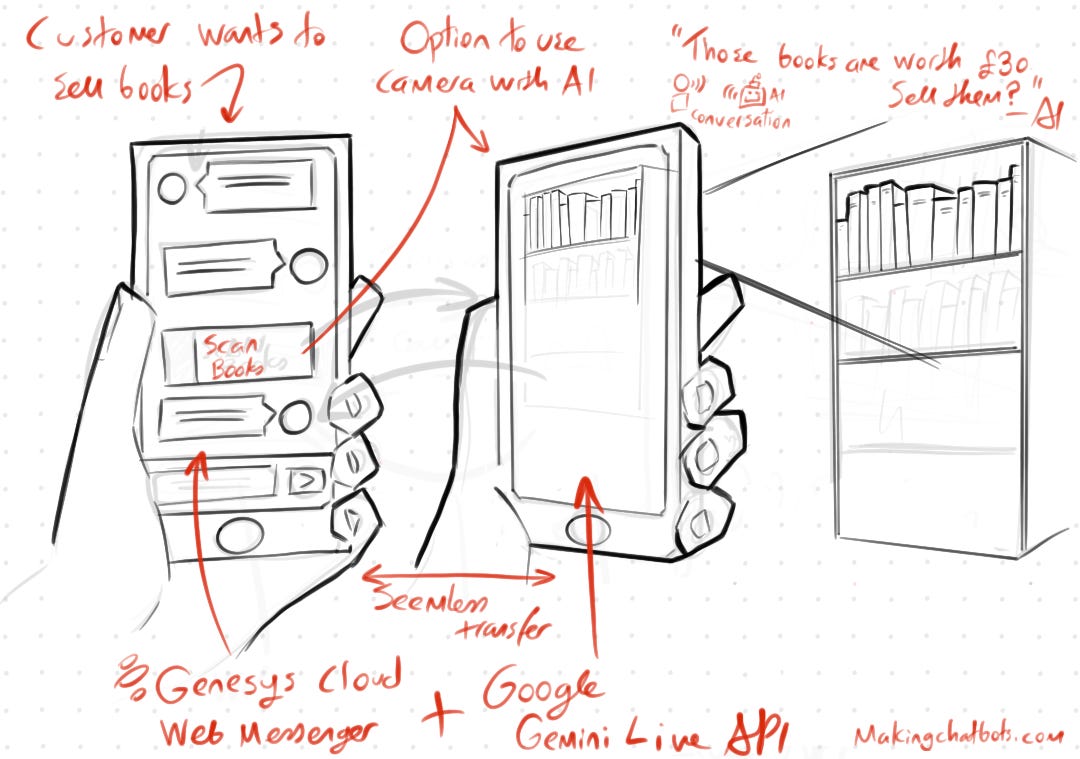
The journey is for my fictional Bookshop. When a customer wants to sell their books they’re offered the ability to talk to a realtime audio/video AI Assistant that will:
Scan their books
Quote the amount my library is willing to pay for them
Create a list of the books
Afterwards they can then continue their chat-based journey with the chosen books.
The Result
After many evenings of playing around with Genesys Cloud, Gemini Live API and Agent Development Kit the result was the following:
How it works
What you observed in the video can be broken into 2 concepts:
AI Video Assistant
Integrating it with a Genesys Cloud Digital Chatbot journey
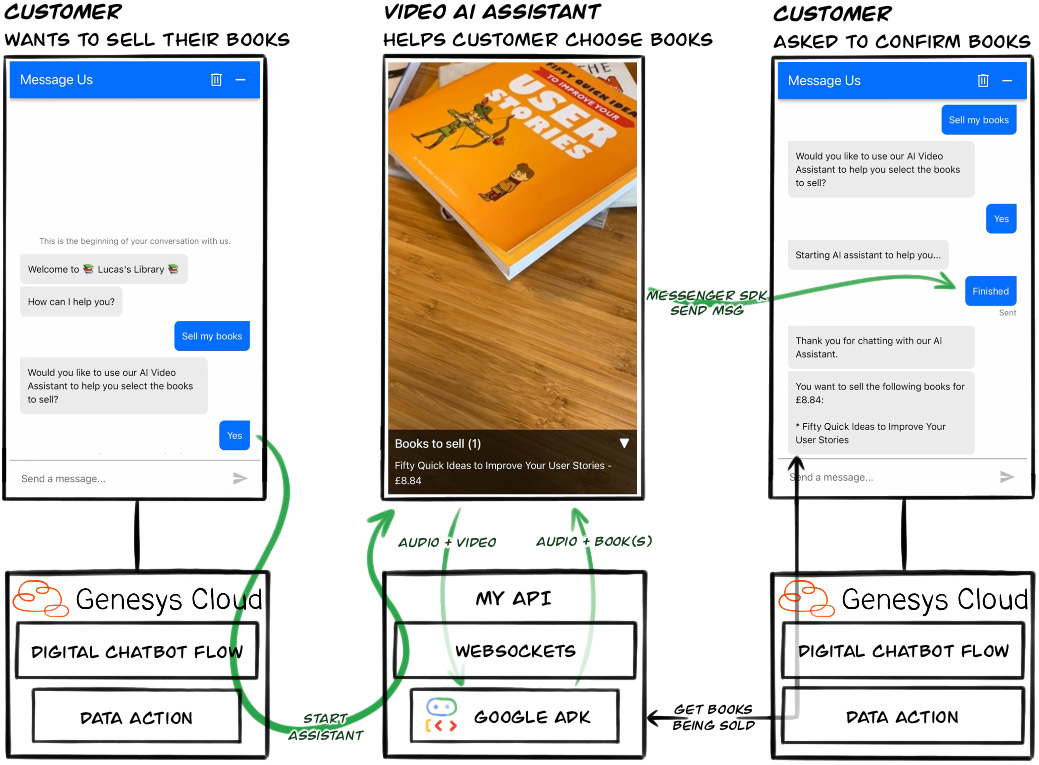
I will start with AI at the core of this journey, then cover how it integrates into the Genesys Cloud flow.
Creating the Live Agent with Google ADK
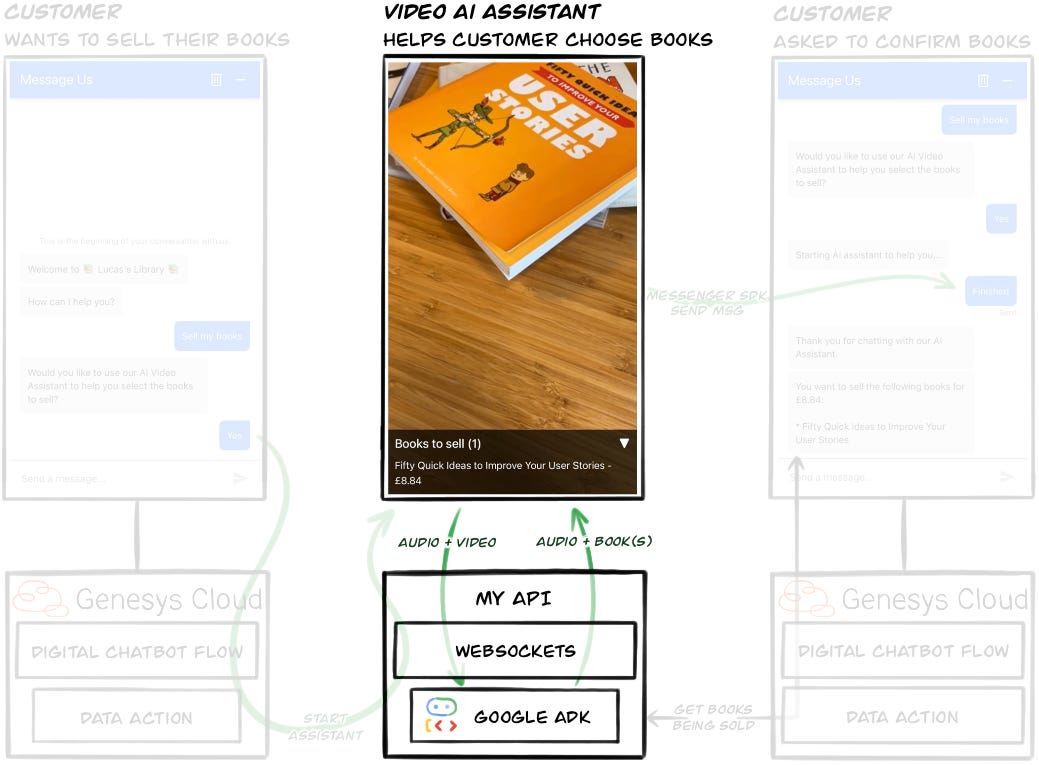
The crux of this CX journey is leveraging two of Google’s technologies:
Gemini Live API which allows low-latency, real-time voice and video interactions with Gemini Live
Google Agent Development Kit which is a modular framework for the development, evaluation and deployment of AI agents
This solution was built around a single AI Agent, which we’ll look at more closely.
Book Pricing Agent
The Book Pricing Agent is designed to:
Identify customer books by scanning their barcode
Fetch a price we’d offer for the book
Maintain a list of books the customer confirmed they’d sell

The definition of the Agent shows its instruction and tooling:
root_agent = Agent(
        name="coordinator_agent",
        model="gemini-live-2.5-flash-preview-native-audio-09-2025",
        instruction="""
You are an AI assistant for a library. Your purpose is to help customers who want to sell their books.

Your primary tasks are:
1.  Identify books by having the customer show you the barcode to scan
2.  Once a book is identified, tell the customer the book’s title and what the shop will offer for it.
3.  Keep a list of the books the customer wants to sell. You can add or remove books from this list based on the customer’s request.
4.  When the customer is ready, you will hand them back to a text-based chatbot to finalise the sale.

Important rules for your behaviour:
-   Always be helpful and professional.
-   When a book is scanned, refer to it by its title. Do not read out the ISBN or barcode number, and do not ask the customer to confirm it.
-   Use your tools to remember which books the customer wants to sell.
-   When the conversation is over, use the ‘transfer_conversation’ tool.
    """,
    tools=[
        # Scans the barcodes from video frames and returns book details
        scan_barcode,

        # Tools for remembering books
        remember_book_customer_is_selling,
        forget_book_customer_is_selling,
        retrieve_books_customer_is_selling,

        # End the conversation and transfer to Genesys Cloud
        transfer_conversation,
    ],
)
The tooling at the bottom of the definition is what the agent can use during a conversation to achieve its goal. They are…
Barcode scanning tool

The Gemini Live Flash model that the Agent is using is multimodal, so can understand what it is seeing as well as hearing. But it cannot read barcodes. So I had to create a tool for it detect and read the barcodes in the video frames it was receiving.
The video above shows a simplified view of the solution I created, which is to give the Agent a tool that when called will process the past 3 seconds worth of video frames to extract the ISBN from a barcode. It then searches for the relevant book’s details.
It works like this:
Agent’s multimodal model determines it is being shown a book
Agent calls the Scan Barcode tool
Scan Barcode tool with its access to last 3 seconds worth of video frames will:
Send frames to my Barcode Scanner Service, which returns the ISBN encoded in the barcode
Queries ISBN against Google’s Books API to get details about the book
Calls the Book API to get a price my fictional library would pay for it
Scan Barcode tool returns to the Agent the ISBN, book’s details and an offer price
Excerpt of the Scan Barcode tool’s code:
async def scan_barcode() -> dict:
    """Returns information about a book based on its barcode.

       This tool reads from a buffer of recent video frames
       to find a barcode.
    """
    if not frame_buffer:
        return {"status": "Cannot read barcode."}

    frames = list(frame_buffer)
    tasks = [
        # Function below:
        # 1. Sends frame to Barcode Scanner API
        # 2. Searches for book details for ISBN in barcode
        _scan_frame_and_search_by_isbn(frame,
                                       video_frame_barcode_scanner,
                                       isbn_book_searcher)
        for frame in frames
    ]
    results = await asyncio.gather(*tasks)

    # ...

    matching_books = [
        {
            "isbn": b.isbn,
            "title": b.title,
            "authors": b.authors,
            "offerPrice": book_pricer.formatted_offer_price(b.isbn),
        }
        for b in deduped_books.values()
    ]

    return {"matching_books": matching_books}
Originally, I’d relied on the browser’s native Barcode Detection API - as I’d shared on LinkedIn. However, it was only when I got an iPhone that I realised this API isn’t widely supported (nor working).
Memory tool

ADK does have a mechanism for memory, but I wanted the memory to be specific to the books being sold, and to have it drive the UI. What I came up with was a memory that consists of three tools:
remember_book_customer_is_selling(isbn: str)Saves book information and offer price by ISBN
Sends event to UI to add book to ‘Books to sell‘ section
forget_book_customer_is_selling(isbn: str)Removes book from memory by ISBN
Sends event to UI to remove book from ‘Books to sell‘ section
retrieve_books_customer_is_selling()-> List[Book]Retrieves all books customer is selling, with offer price totalled
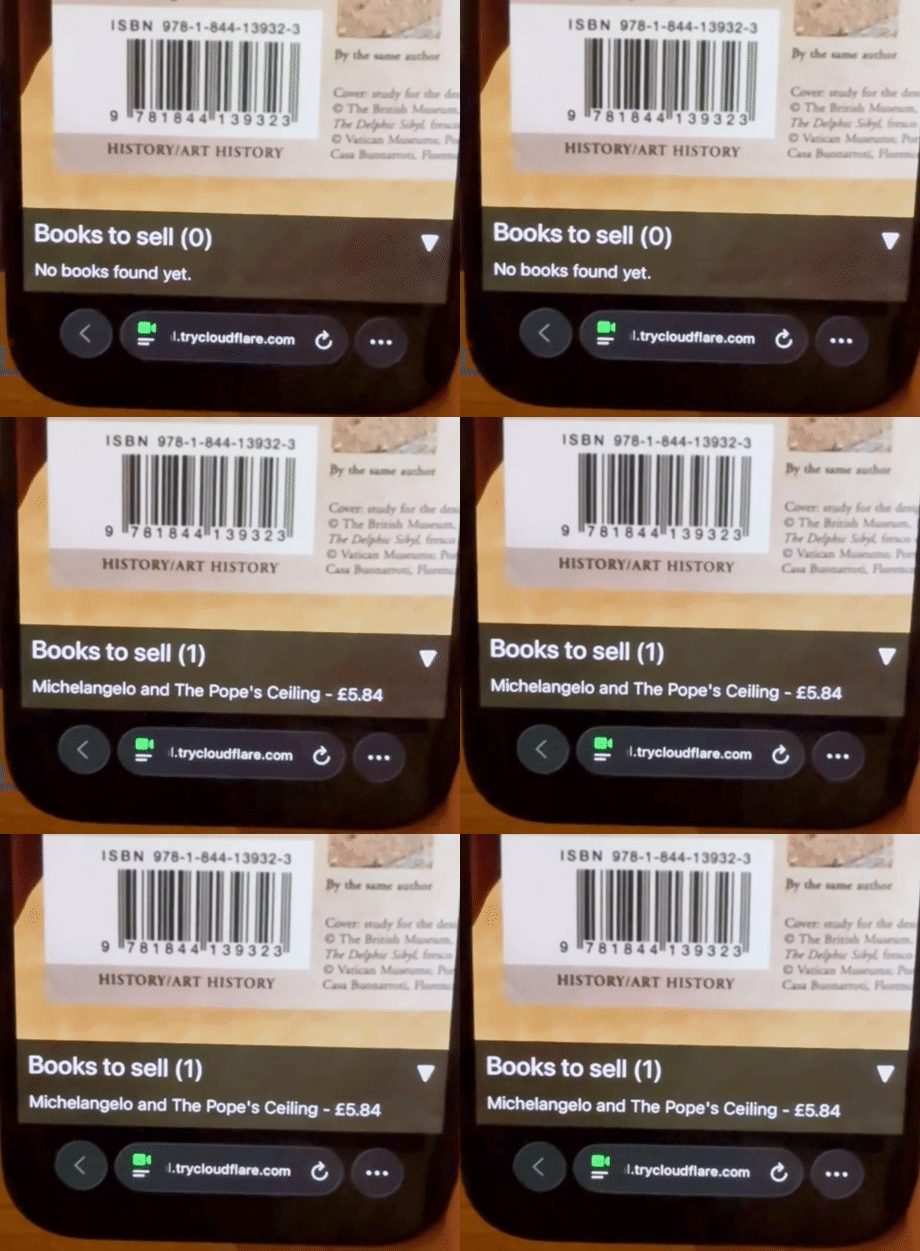
This is what the UI looks like when the customer agrees on a book to sell:
Transfer to Chatbot tool

The last tool to be called is transfer_conversation. This tool allows the Agent to transfer control back to Genesys Cloud.
When this tool is called it causes the My API to instruct the front-end to replace the AI Assistant UI with the Web Messenger chat UI - covered more in the next section.
Integrating with Genesys Cloud
Now that we have covered the AI Video Assistant let’s look at how we integrate it into a Digital Chatbot in Genesys Cloud’s Web Messenger.
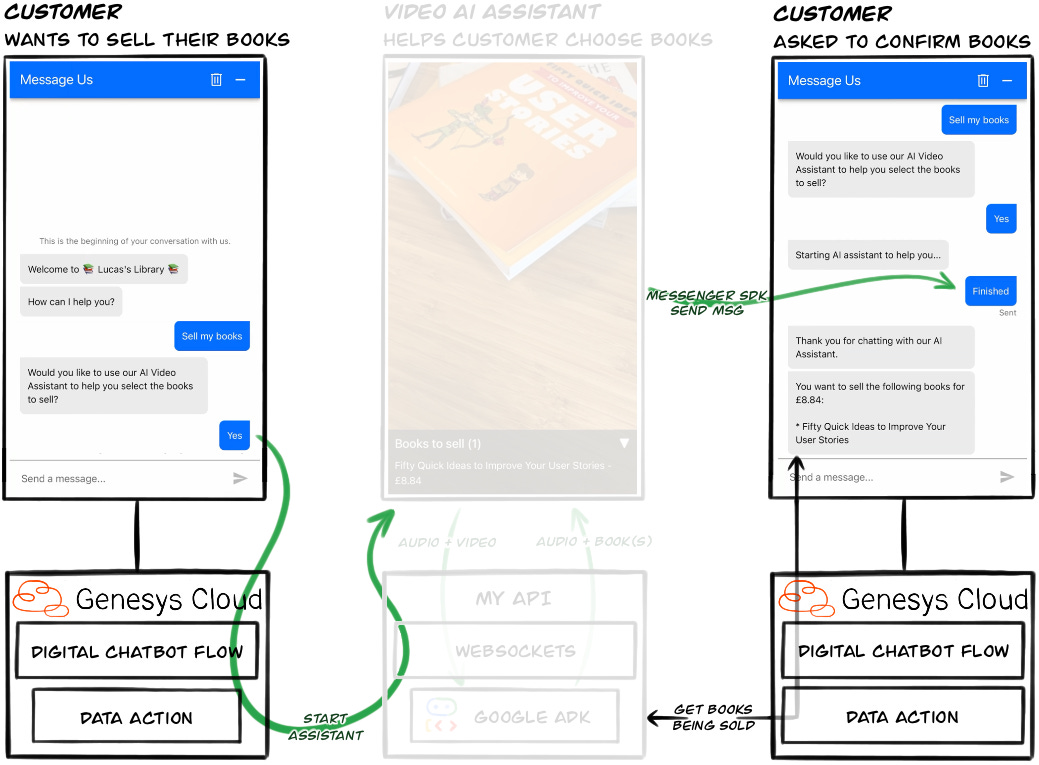
There are two sides to this interaction:
The customer is transferred from a Digital Chatbot Flow to the AI Assistant
The AI Assistant transfers the customer back to the Digital Chatbot Flow
Both sides are built to be resilient to failures.
Transferring to the AI Assistant
The customer starts their journey in Genesys Cloud’s Web Messenger UI, but even before they send their first message something important has happened...
The customer’s browser establishes a Websocket connection with My API, and associates that connection to a Customer’s Journey Session ID. This means two things:
The browser and My API have a bidirectional connection outside of the chat
My API has associated the customer’s browser with an ID that an Architect Flow also knows, allowing a flow to send messages to My API via a Data Action and have them forwarded to the customer’s browser
This is how it works:
The Customer Journey Session ID for the conversation is retrieved using the Messenger JavaScript SDK:
const channel = new BroadcastChannel("genesys-cloud-agent");

Genesys('subscribe', 'MessagingService.ready', () => {
    Genesys('subscribe', 'Conversations.started', function (event) {
        const journeySessionId = event?.data?.journeyContext?.customerSession?.id;

        channel.postMessage({
            type: "conversation_started",
            customerSessionId
        });
    });
});
This ID is then used in the URL when establishing the WebSocket connection:
const channel = new BroadcastChannel("genesys-cloud-agent");

channel.addEventListener("message", async (event) => {
    const messageType = event.data.type;
    switch (messageType) {
        case "conversation_started":
            //...
            connectToServer(event.data.customerSessionId);
            break;
        //...
    }
})

function connectToServer(customerJourneyId) {
    const websocket = new WebSocket(`wss://${serverUrl}/ws/${customerJourneyId}`);
    //...
}
When the Digital Chatbot flow wants to switch the customer’s UI to the AI Assistant it simply calls the relevant Data Action with the Customer Journey Session ID that the upstream Inbound Message flow passed to it.
Why a Customer Journey Session ID instead of the Conversation ID? Well, I was unable get the Conversation ID from the Messenger SDK. Do let me know if you know of a way…
Transferring back to the Digital Chatbot flow
I chose a different approach when transferring from the AI Assistant back to the chat:
Just after transferring the customer to the AI Assistant the Digital Chatbot sends a Quick Response message to the minimised chat window, asking if the customer has finished with the AI Assistant
When the AI Assistant has finished it calls the Transfer tool. This results in a command being sent to the customer’s browser.
The client-side code then:
Closes the AI Assistant UI
Maximises the Web Messenger UI
Resumes the conversation by using the SendMessage command to response to the Quick Reply in step 1
function continueConversation(){
    Genesys('command',
        'MessagingService.sendMessage',
        {message: 'Finished'},
        (data) => { /* ... */ },
        (error) => { /* ... */ }
    );
}
This approach allows the customer to continue the conversation should the AI Assistant fail unexpectedly, and avoids any awkward polling of My API in the Architect flow.
Considerations
As with any solution, there are considerations you have to take into account. Here are 3 of the biggest with this solution.
Data split between multiple systems
Joining different systems may allow you to leverage the latest and greatest functionality, but unless these systems are closely integrated you’ll end up with data pertaining to a customer’s journey existing across them.
In this case the AI Assistant is completely separate to Genesys Cloud, so the conversation is not included in the Genesys Cloud’s transcript, nor included in any Speech and Text Analytics.
A2A will be a better way to integrate
With Genesys Cloud investing in Agentic CX, and Google investing heavily in their Agent Development Kit (ADK), one hopes it is only a matter of time until both platforms can be integrated over the Agent2Agent protocol.
However, at the time of creating this experiment A2A could not be used to integrate the two. Which explains the complexity needed in transferring between the systems.
When A2A is widely available I foresee marketplaces of specialised agents that can be leveraged for specific parts of a customer’s journey.
The result would be highly specialised agents all working together to deliver for a customer.
Safety
We’ve all heard the horror stories of freshly implemented AI chatbots running amok with a company’s reputation. So ensuring any AI Assistant is bounded to a particular task, grounded, extensively evaluated and restricted by sufficient guardrails is a must.
The Gemini Live API, which was freshly out of GA at the time of implementing this solution cannot be used with Google’s Model Armor, and I was unable to find any mature third-party guardrail solutions compatible with the Live API’s streaming architecture.
There is also little in way of evaluations that simulate audio/video to test an agent’s performance using the Gemini Live model. You can get part the way there though by switching to a text-based model to evaluate the reasoning part of the agent.
Anecdotally, the model did a great job of refusing to diverge from its task.
Conclusion
This project has provided a glimpse into what capabilities may be easily integrated into customer journeys of the future. However, for the time being with these two platforms workarounds are required to create a coherent flow.
Naturally there are also questions around whether this makes for a good CX journey anyway… I created the journey out of curiosity of the technologies and how they fit together, not based on CX research. But it sure was fun!
If you have any questions, or have suggestions on how I can improve the flow please do get in contact.